
Rillsoft Connect: the Android app for Rillsoft Cloud
Rillsoft Connect is the mobile client of the Rillsoft platform. Employees, team leaders and project managers record working time, document progress with photos, request vacation and review the schedule of their project – at the workplace, on the go and even without a network connection. Everything reported in the app goes straight into your Rillsoft Cloud tenant: into time tracking, vacation planning and document management.
No setup for cloud customers. The app comes preset to
https://www.rillsoft.cloud. Install it, sign in with the user account of your tenant – done. No server address, no firewall rule, no configuration.
The app is available for Android on the Google Play Store. The download is free – the app is used with the user account of your tenant.
Four tasks the app takes mobile
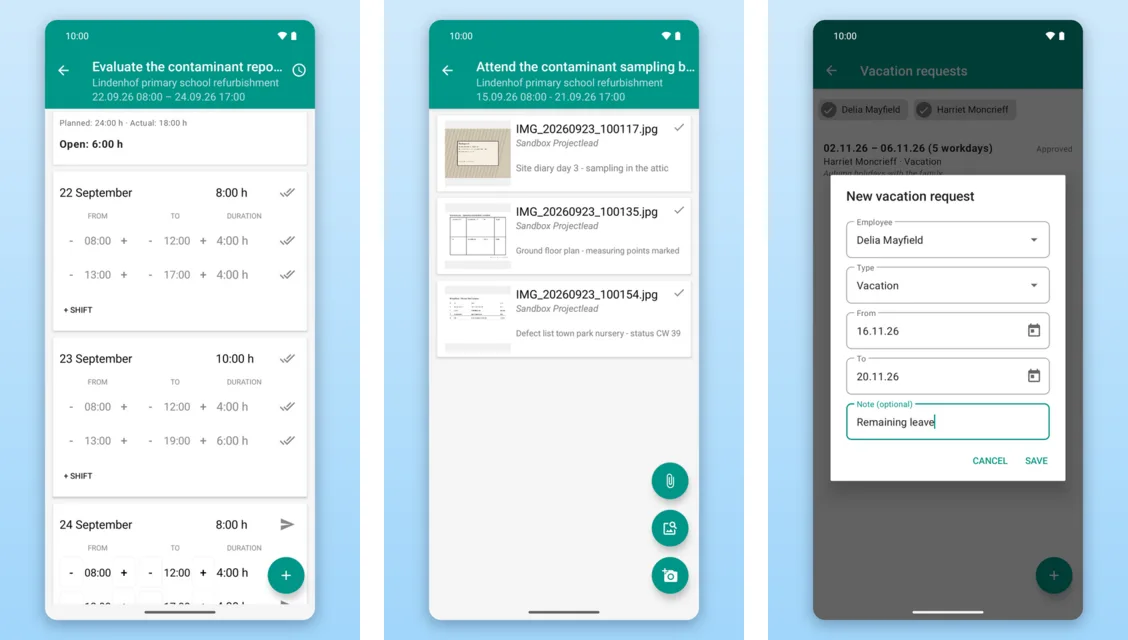
- Report time – record working time per task, day and employee, for one person or for a whole team. Planned and reported hours are kept apart: planned shifts as a template, reported entries with status (recorded, sent, confirmed); plus remaining effort and a note per task.
- Photos and documents – take or pick images, add captions and attach them to a task; download, view and add documents from the document management.
- Vacation – submit and cancel requests, view the team calendar.
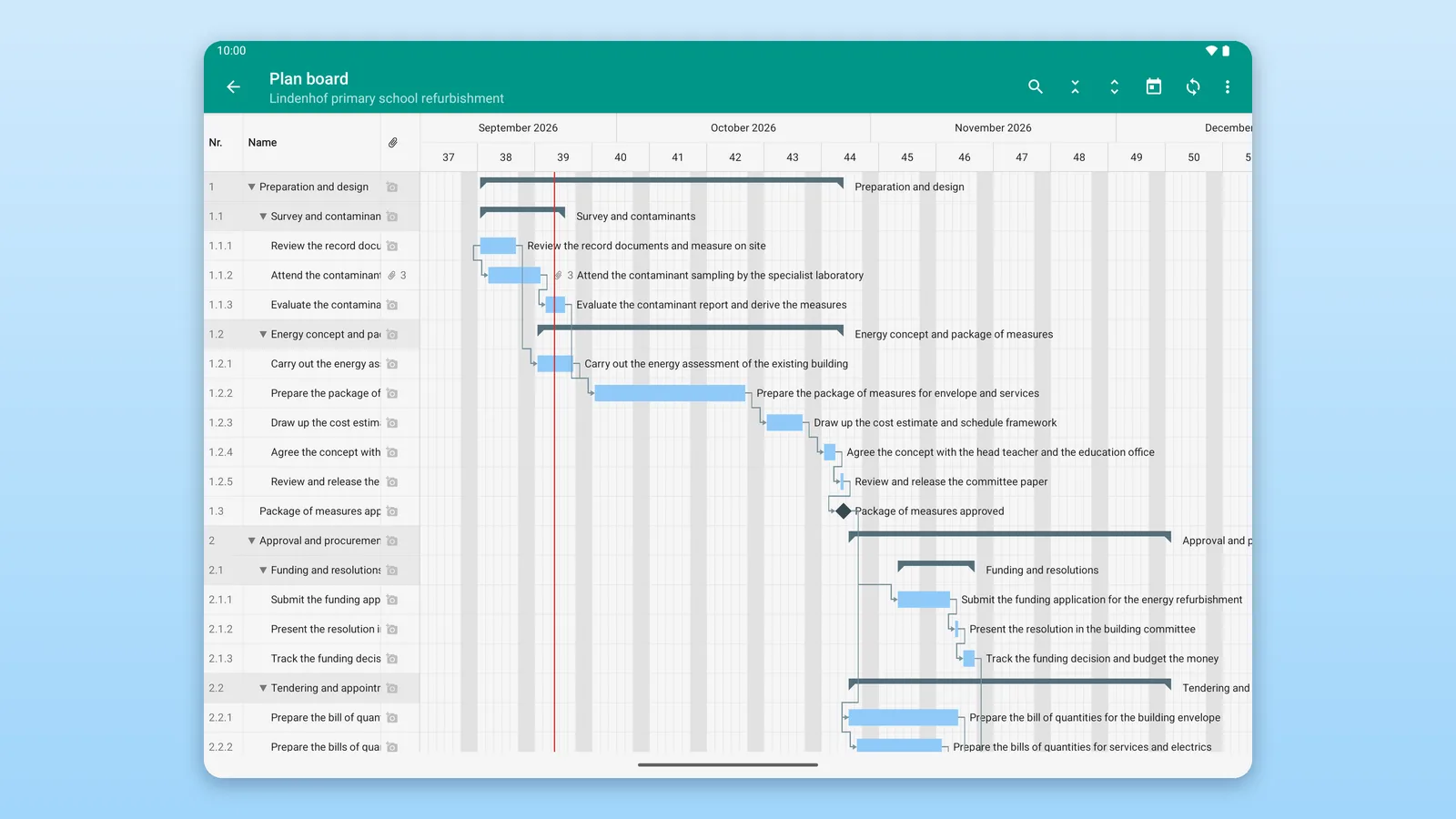
- Planning board (tablet optimized) – table and bar chart with dates, milestones, links and photo counters, read only, with search across all tasks stored on the device.
No setup for cloud customers
Operators of their own Rillsoft Integration Server enter the address of their server in the app. For Rillsoft Cloud this step is not needed, because the cloud is preset:
- Install the app – get Rillsoft Connect from the Google Play Store.
- Sign in – enter user name and password of your Rillsoft Cloud user account. Leave the “Server” line as it is.
- Get going – the first synchronization fetches all projects, tasks and planned shifts you are allowed to see within a few seconds. Then the task list of the current week is ready.
The user account is created by the administrator of your tenant, just as for the web interface. The quick start in the user help explains this step by step.
Work offline, synchronize later
The data of your working period is stored on the device. Recording, taking photos and submitting requests works without a connection – in the basement, on the construction site, in a dead zone. As soon as the network is back, the app synchronizes with your tenant in the background. Unsent changes stay visible until the server confirms them.
Roles: employees report, team leaders approve
Employees report time, photos and vacation for themselves – or, as team leaders, for several people at once. Team leaders and project managers review and approve reported time on the go. Approval follows the roles, permissions and organigrams you have defined in your Rillsoft Cloud tenant; the app takes them over, with nothing to maintain twice. Which functions someone sees in the app depends on these permissions. Several tenants can be used with a single sign-in.
What it costs
The app costs nothing extra: no separate app subscription, no ads, no in-app purchases. Rillsoft Connect uses the user accounts of your tenant; billing stays with your Rillsoft Cloud subscription as before. An active subscription or a running free trial is required. You cannot create an account or buy anything inside the app.
Technical requirements:
- Android 7.0 or newer, smartphone or tablet
- A user account in your Rillsoft Cloud tenant
- An active subscription or running trial of the tenant
- Internet connection for sign-in and synchronization
User help and privacy
- The Rillsoft Connect user help contains quick start, task-oriented help, roles, expert knowledge and reference.
- The app transfers data only over an encrypted connection (HTTPS) to your Rillsoft Cloud tenant – no advertising IDs, no tracking, no sharing with third parties. Signing out removes credentials, the local database and downloaded documents from the device. Details are in the privacy policy for Rillsoft Connect.
- For the operation of Rillsoft Cloud itself, the Rillsoft Cloud privacy policy applies.
Frequently asked questions
Do I need a separate app subscription?
No. The download is free, and the app contains no ads and no in-app purchases. It uses the user account in your Rillsoft Cloud tenant; an active subscription or a running free trial of the tenant is required.
Does the app work with a sandbox tenant?
Yes. A sandbox tenant with an industry example is an ordinary tenant with synthetic data. It appears next to your own tenant, and several tenants can be used in the app with a single sign-in – so you get to know the app on example projects before working with your own data.
Do employees see all projects?
No. The task list shows the tasks on which a person – or, for team leaders, their people – is scheduled, and only what the permissions in the tenant allow. If a permission is missing, the function is missing in the app. The planning board is available to project managers.
What happens without a network connection?
The app keeps working. The data of your working period is stored on the device; time entries, photos and vacation requests are saved locally and sent in the background as soon as the network is back. Unsent changes stay visible until the server confirms them.
Where are the photos stored?
In your tenant. Photos and documents are attached to the task and end up in the document management of Rillsoft Cloud – where project managers see them in Rillsoft Project and in the web interface. Signing out removes downloaded documents from the device.
Try Rillsoft Cloud for free
No tenant yet? Try Rillsoft Cloud for free – the app signs in there without any further setting. Choose a sandbox tenant with an industry example when you register: then you get to know Rillsoft Cloud and the app on ready-made projects with a resource pool, without entering your own data.